Change and manage password
If you have forgotten your password, it has expired, or you want to change it, you can do so by clicking the buttons below.
- Visit https://rmit.edu.au/password
- Enter your RMIT ID and last name
- Complete the ‘I’m not a robot’ reCaptcha test
- Note: if you can’t see the reCaptcha test, contact IT Service Connect for help changing your password
- Select Submit
- Choose whether to send a verification code to your mobile phone (via text) or to your personal email address
- Retrieve the code and enter it into the field
- Select Continue
- Create a new password and confirm it
- Select Change Password
Note, when you update your password:
- It may take up to 15 minutes to sync across all RMIT systems
- Your devices will disconnect from the RMIT-University Wi-Fi. Find out how to reconnect to the RMIT-University Wi-Fi
Key terms
- Student number: Your seven-digit identification number. You can find it in your enrolment email from RMIT
- RMIT ID:
- Students: The letter ‘s’ + your student number (with no additional letters.) Example: s1234567
- Staff: The letter ‘e’ followed by your employee number. You can find it in your ‘Getting started at RMIT’ email
- RMIT email address:
- Students: Your RMIT ID + @student.rmit.edu.au. Example: s1234567@student.rmit.edu.au
- Staff: Your name with a ‘.’ in between each name + @rmit.edu.au Example: firstname.lastname@rmit.edu.au. You can find it in your ‘Getting started at RMIT’ email
- Multi-factor authentication (MFA): required when logging in to most RMIT systems. You must register for MFA on your device
Log in for the first time
If you're a new student, follow the instructions below to log in to RMIT systems for the first time.
Step 1: Change your temporary password
- Visit https://mypassword.rmit.edu.au
- Enter your RMIT ID
- Your RMIT ID is the letter ‘s’ + your student number (with no additional letters.) Example: s1234567. If you don't know your student number, you can find it in your enrolment email from RMIT
- Enter your temporary password
- Your temporary password is the letter ‘p’ followed by your date of birth in the format YYYYMMDD, with an exclamation mark ‘!’ on the end. Example: If your date of birth is 8th April 1998, your temporary password is p19980408!
- Select Change Password
- Create a new password and confirm it
- Select Change Password
Your new password may take 15 minutes to sync across all RMIT systems.
Step 2: Set up multi-factor authentication (MFA)
MFA is required when logging in to RMIT systems and applications.
That's it, you're all set up and ready to use RMIT systems! For easy access to all RMIT student systems, see the Student essentials section at the top of the Current students homepage.
FAQs
Your password expires after 12 months without being changed.
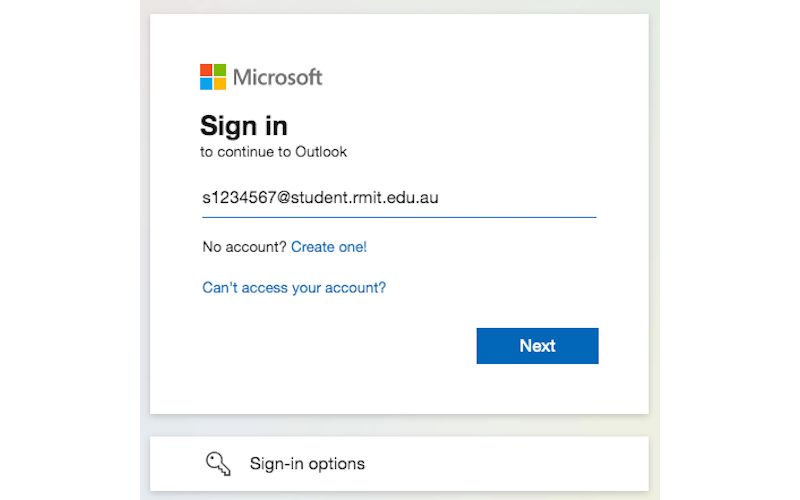
There’s two different login pages you may come across.
1. Microsoft sign in: Use your RMIT email address and password
2. MyApps Portal: Use either your RMIT ID or email address and password
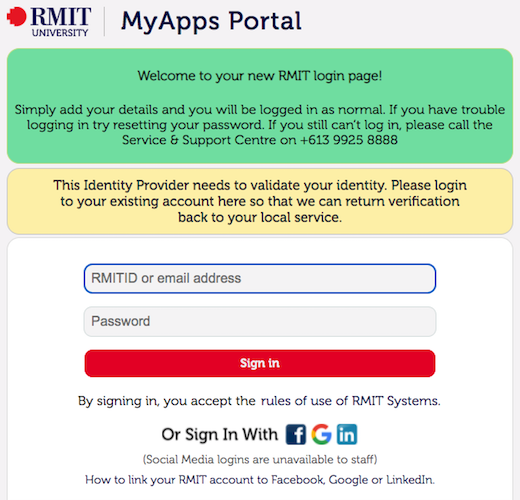 MyApps Portal
If you try to change your password using the ‘Can’t access your account’ link on the Microsoft sign in page, you’ll get an error saying “You can’t reset your own password because password writeback isn’t turned on for your organisation. You must contact your administrator.”
You can reset your own password; you just need to use RMIT’s Self Service Password Reset portal.
No, once you graduate, RMIT is legally required to deactivate your student email account and cancel your access to all RMIT systems and software (including third-party software and apps available to you as an RMIT student).
You will lose access to all RMIT systems and software on the day you graduate (unless you’re continuing your studies with RMIT).
Non-award students who complete their program (but do not graduate) will have seven (7) days from their program completion date to save any important information to their personal devices before they lose access.
Please save any information stored in your student email or on RMIT systems to your own personal device or cloud storage before you graduate. Please refer to How do I back up my data before I lose access to my RMIT account? to find out how.
Need help?
For assistance with all RMIT IT systems, contact IT Service Connect.


Acknowledgement of Country
RMIT University acknowledges the people of the Woi wurrung and Boon wurrung language groups of the eastern Kulin Nation on whose unceded lands we conduct the business of the University. RMIT University respectfully acknowledges their Ancestors and Elders, past and present. RMIT also acknowledges the Traditional Custodians and their Ancestors of the lands and waters across Australia where we conduct our business - Artwork 'Sentient' by Hollie Johnson, Gunaikurnai and Monero Ngarigo.
Learn more about our commitment to Aboriginal and Torres Strait Islander peoples