Phishing simulation shows why it pays to stop and check before you click

Phishing simulation shows why it pays to stop and check before you click

After a recent phishing simulation, we’re sharing what the results can teach us about credential-harvest phishing, why fake login pages can be convincing, and what to check before you enter your RMIT username or password.

RMIT recently ran a phishing simulation to help students practice spotting suspicious messages in a safe way. The simulation showed how easy it can be to click when a message looks familiar, takes you to a login page, or makes you feel like you need to act quickly.

During the simulation period, around 45% of recipients clicked the suspicious link. Of those who clicked, around 25% went on to offer their credentials.

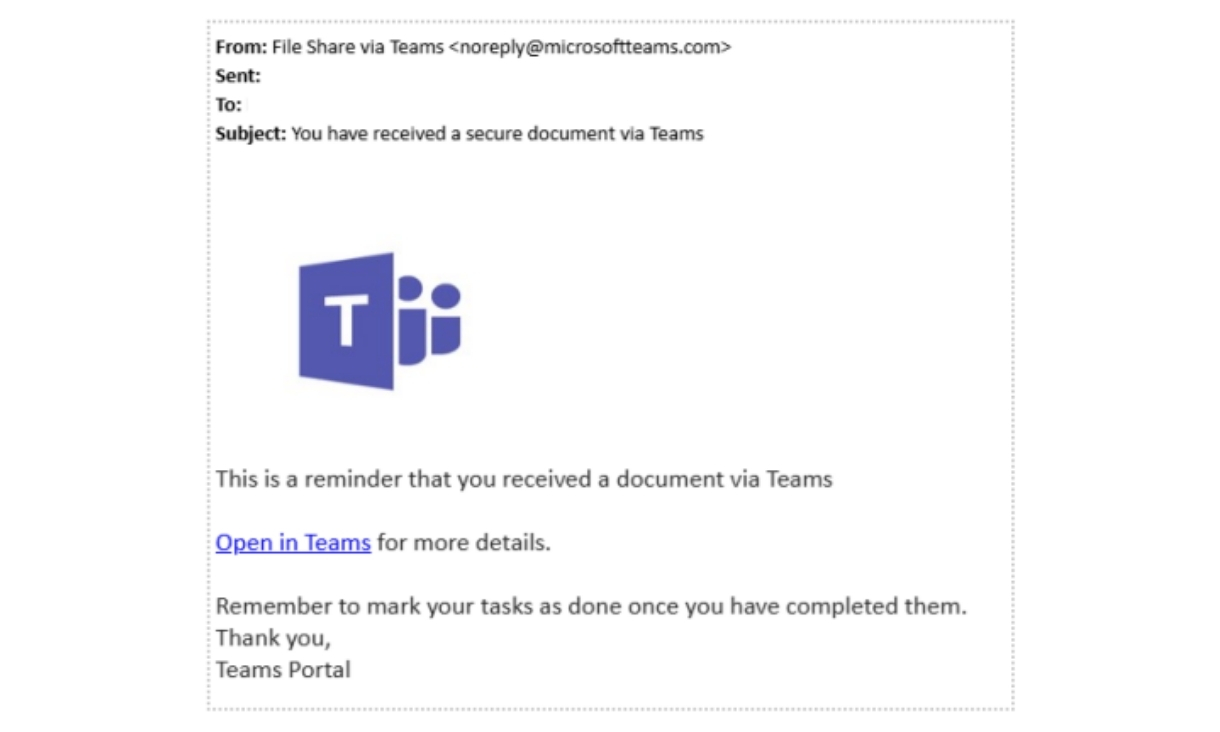
The email used in this simulation was a credential-harvest phishing attack. This type of phishing tries to trick you into entering your RMIT username and password into a fake login page.

Screenshot of example phishing emailThe page may look like a real Microsoft sign-in screen, so always check the website's address carefully and compare it with the way you would normally access that service.

Some of the signs that the email was suspicious include: 

  • The From address is not legitimate 
  • Files are typically shared via SharePoint and not Teams. 
  • The reminder is for a previous notification that was never sent. 

Phishing attacks are becoming more sophisticated, and they don’t always look obvious. 

Some messages can copy trusted brands, refer to real university activities, or use language that makes you feel like you need to act quickly.

Your username and password are valuable because they can be used to access your accounts, personal information, and university systems.

Stolen credentials are often sold, reused, or used as the first step in a wider cyber-attack.

RMIT has protective controls in place to help scan, block and intercept threats, but recognising suspicious sign-in requests before you enter your details is one of the best ways to protect yourself.

That’s why it’s worth taking a moment to stop, check and report anything suspicious.

Phishing red flags to look out for include:

  • Requests for user names, passwords, payment details, or personal information
  • Sender names, email addresses, or domains that do not look right.
  • Unexpected links or attachments, especially with urgent instructions.
  • Messages that feel unusually urgent, personalised or convincing.

If something looks suspicious: 

  • Do not click links or open attachments.
  • Use the Report button (shield icon) in Outlook to flag the email for review.

If you have clicked a suspicious link, opened a suspicious attachment or entered your details into a page you are unsure about, contact IT Service Connect right away for help.

People often click phishing links because they are distracted, scrolling quickly through emails, or trying to clear tasks in a hurry. If you realise afterwards that something was suspicious, report it straight away. The earlier you report, the faster RMIT can help protect your account and check whether anything else needs to be done.

People often click phishing links because they are distracted, scrolling quickly through emails, or trying to clear tasks in a hurry. If you realise afterwards that something was suspicious, report it straight away. The earlier you report, the faster RMIT can help protect your account and check whether anything else needs to be done.

Get the right information and support

  • If you have clicked a suspicious link or opened a suspicious attachment, contact IT Service Connect right away for help.
  • For practical tips to protect your accounts, devices and information, see RMIT’s Cyber Safety web page.
  • To learn about scams currently targeting students, how to identify and avoid them, and where to get help if you think you've been targeted, see RMIT’s Scams Targeting Students page.
  • If you suspect you have been or are being scammed, you are strongly encouraged to contact Safer Community for advice and support.

Know your IT responsibilities

Everyone at RMIT plays a part in keeping accounts, systems, and information safe. As a student, you can help by following the guidance in:

14 September 2026

More student news

aboriginal flag float-starttorres strait flag float-start

Acknowledgement of Country

RMIT University acknowledges the people of the Woi wurrung and Boon wurrung language groups of the eastern Kulin Nation on whose unceded lands we conduct the business of the University. RMIT University respectfully acknowledges their Ancestors and Elders, past and present. RMIT also acknowledges the Traditional Custodians and their Ancestors of the lands and waters across Australia where we conduct our business - Artwork 'Sentient' by Hollie Johnson, Gunaikurnai and Monero Ngarigo.

Learn more about our commitment to Aboriginal and Torres Strait Islander peoples