Parking at Bundoora: what’s changed and how to use the new system

Parking at Bundoora: what’s changed and how to use the new system

If you’re driving to Bundoora campus, here’s a quick guide to what’s changed, how casual parking works, and how to decide if a permit is right for you.

This information is accurate from 5 March 2026.

The system has recently moved to a cashless, app-based model. While the change is straightforward once set up, we know it can feel different if you were used to the previous system. This guide steps you through what to do and where to get help if you need it.

What’s changed at Bundoora?

  • Casual parking is now paid via the RMIT Parking app (cash is no longer accepted).
  • Paid parking applies 8am–4pm, Monday to Friday.
  • Parking is free outside these hours.
  • Permits can be purchased through the RMIT Permit Web Portal.
  • There are no price increases in 2026 for casual parking or permits.

If you arrive before 8am and stay into the paid period, you’ll only be charged for time within the paid hours.

For example, if you arrive at 7.30am and leave at 5.30pm, you’ll only be charged for 8am–4pm.

How to use the RMIT Parking app

The parking system is new, so you may notice minor delays the first time you use the app. Setting it up before you arrive on campus can make parking quicker and reduce stress. 

We are working on resolving some bugs. Please follow the most up-to-date instructions below:

Set up the parking app

  1. Download the RMIT Parking app from the App Store or Google Play.
  2. Log in using your RMIT email and password.
  3. Go to Profile > My Account and:
  4. Manage vehicles – add your car registration details.
    1. Tap the words Description to give your vehicle a name (e.g., White Volkswagen), and License Plate to enter your registration. Enter your registration without spaces (e.g., ABC123).
  5. Payment options – add the card you’ll use to pay for parking.

Once you’re parked

  1. Open the app and log in.
  2. Select your vehicle (or add it if needed as outlined above).
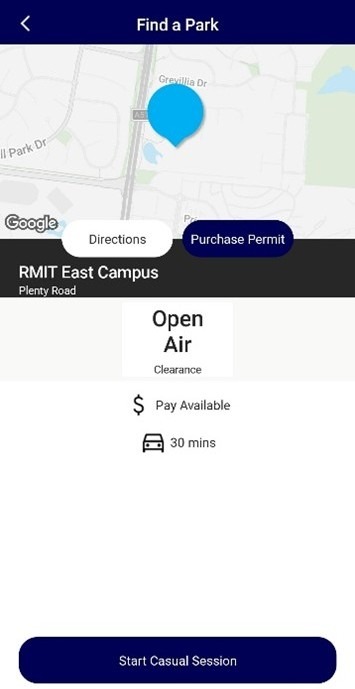
  3. Tap Find a park. A map will display parking locations at Bundoora East and Bundoora West (may take a moment to load).
    • You can also tap List (top right) or Zone and enter the zone number shown on car park signs. 
  4. Tap Pay/ Start Casual Session to set up your session (you won’t be charged yet).
  5. Tap the white bar next to the blue 00:00 to select your parking duration. 
  6. Confirm payment to start your session.
Screenshot of the "Find a Park" page in the RMIT Parking app Screenshot of the "Find a Park" page in the RMIT Parking app
Need to stay longer? 

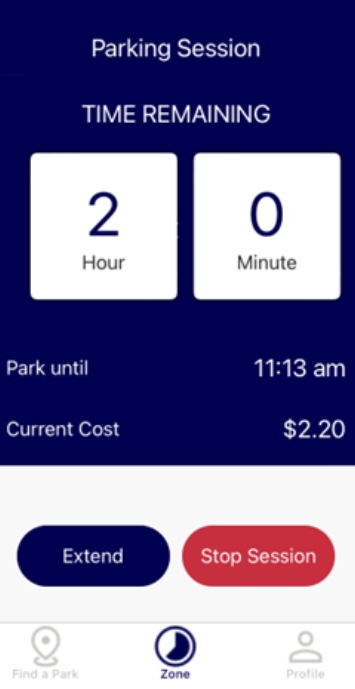
Open the app, tap Zone to display your current session, then choose Extend session and add the extra time.

Leaving earlier than planned? 

Open the app, tap Zone to bring up your active session, then press Stop session to end it. You’ll only be charged for the time used.

Tip: If your class or lab finish time is uncertain, consider starting with the time you’re confident you’ll need and extend if required.

Screenshot of the “Extend” and “Stop Session” page in the RMIT Parking app Screenshot of the “Extend” and “Stop Session” page in the RMIT Parking app

Should you get a parking permit?

If you park regularly at Bundoora, a permit may be more cost-effective and convenient.

Benefits include:

  • One upfront payment rather than daily transactions
  • No need to start a session each day
  • Potential savings of up to $200 per year (depending on how often you park)

Permits are available instantly via the RMIT Permit Web Portal. Once purchased, your vehicle registration is linked to your permit.

Parking fines and support

Parking inspectors monitor campus parking in line with State Government requirements. Infringement amounts are set by Fines Victoria, not RMIT.

If you receive an infringement notice and are experiencing financial hardship, you may be eligible for the Work Development Permit (WDP) scheme.

Through WDP, eligible students can use approved activities, including attending classes, to work off fines. RMIT is an approved sponsor.

To enquire about WDP, contact RMIT's Student Welfare team.

Need help?

For questions about parking operations, payments or technical issues, contact Care Park:

E: customerservice@carepark.com.au 
P: 03 9957 5520

05 March 2026

More student news

aboriginal flag float-start torres strait flag float-start

Acknowledgement of Country

RMIT University acknowledges the people of the Woi wurrung and Boon wurrung language groups of the eastern Kulin Nation on whose unceded lands we conduct the business of the University. RMIT University respectfully acknowledges their Ancestors and Elders, past and present. RMIT also acknowledges the Traditional Custodians and their Ancestors of the lands and waters across Australia where we conduct our business - Artwork 'Sentient' by Hollie Johnson, Gunaikurnai and Monero Ngarigo.

Learn more about our commitment to Indigenous cultures