Apprentice and trainee enrolment guide

To enrol and secure your place as an apprentice or trainee, complete all steps in this enrolment guide.

It can take some time to complete all enrolment steps. We recommend you start your enrolment as soon as possible.

To enrol, please use a desktop or laptop computer, and enable pop-ups in your browser settings.

How to enrol – Part 1

You need to complete the following steps before you can enrol. 

Step 1. Complete a Language, Literacy and Numeracy (LLN) assessment

All students commencing a vocational education program must complete the LLN, an online English and maths assessment.

You must complete the LLN before you can enrol.

Find out more about the LLN, including how to complete it and frequently asked questions. 

Already completed the LLN?

If you’ve already completed the RMIT LLN assessment, you don’t need to complete it again. You can continue to Step 2. Collect your documents and information.

Complete the LLN

It will take about 45 minutes to complete each assessment.

Log in to complete the LLN

Access the reference guide for the LLN (PDF, 653KB)

  • Your username is the letter 's' followed by your student number (excluding any additional letters), eg: s1234567. 
  • Your password is the letter ‘p’ followed by your date of birth backwards and an exclamation mark (example: p19920428!)

it usually takes about 1 hour for your results to be registered with RMIT. You'll be contacted via email or receive a phone call if we need to clarify any information.

Step 2. Collect your documents and information

You must have the following documents and information to successfully enrol.


a. Passport, birth certificate or documents to verify your citizenship

You will need your current Australian/New Zealand passport (preferred), Australian citizenship certificate, birth certificate or other approved documentation to verify your citizenship. You'll need the same documents to prove your eligibility for a government subsidised place (see How to enrol Part 2, Step 3)

IMPORTANT: If you used a different name to apply to RMIT, i.e. not your full legal name as it appears on your document, you’ll have the chance to update it when you log in to Enrolment Online.  

If your names don't match, you won't be able to enrol. 

Find out how to update your legal name and preferred name options.


b. Student ID, RMIT email address and temporary password 

You’ll use your student ID, RMIT email address and temporary password to access Enrolment Online (RMIT’s enrolment system) and other RMIT systems. 


  • Student ID

Your Student ID (also referred to as your RMIT ID) is the letter 's' followed by your student number (excluding any additional letters).  

Example: s1234567 

Your student number is in your offer email from RMIT. 

  • RMIT email address

Your RMIT email address is the letter 's' followed by your student number (excluding any additional letters) and ‘@student.rmit.edu.au’. 

Example: s1234567@student.rmit.edu.au 

Your student number is in your offer email from RMIT.

You may need to access your email to complete the enrolment process. Find out how to access and use your RMIT email. 

  • Password

New students: Your temporary password is the letter 'p' followed by your date of birth backwards, with an exclamation mark '!' at the end.

Example: If your date of birth is 8 April 1998, then your password is p19980408! 

Returning students: Your password is the last password you set while studying at RMIT. We recommend resetting your password if you don't remember it. 

Find out more about your login details, password and accessing RMIT systems.


c. Register for multi-factor authentication (MFA) 

MFA requires a user to provide two factors of verification:

  1. an email address and password, and
  2. a request (yes or no response) or a passcode sent to your mobile phone. MFA adds an extra layer of protection to keep your data and RMIT networks more secure. 
d. Centrelink Concession Card (if eligible)

If you’re enrolling in a Certificate I–IV program, you can use your current Commonwealth Health Care Card, Pensioner Card or Veteran’s Gold Card to apply for a VE fee concession.


e. Transcripts from previous study (if applying for credit)

You'll need your transcripts if you want to apply for credit.


Give yourself plenty of time to get the documents you need - if you’re applying for a passport or concession card, it can take some weeks to arrive.

Step 3. Create your Unique Student Identifier (USI)

The USI is a reference number that will give you access to an online record of all of your recognised training and qualifications.

It’s a government requirement that you have a USI to enrol in a vocational education program.


a. Get your ID ready

You’ll need ID such as a current passport, full birth certificate or driver’s license. You must use the same ID when you verify your citizenship and identity.


b. How to get a USI 

You must use your full legal name to create a USI. Make a note of your USI because you’ll need to provide it when you enrol. 

Note: your name must match the order and placement of your full legal name recorded at RMIT. If there’s a discrepancy between your recorded name in the USI Registry and our systems, you won’t be able to verify your USI and enrol. 

How to enrol – Part 2

Follow these steps in Enrolment Online.

Some steps may require a response from RMIT, but you can take breaks and return to Enrolment Online when ready to continue.

Step 1. Log in to Enrolment Online


a. Log in to Enrolment Online

Log in to Enrolment Online using your RMIT email address, temporary password and MFA (see Part 1, Step 2, b. and c. above).

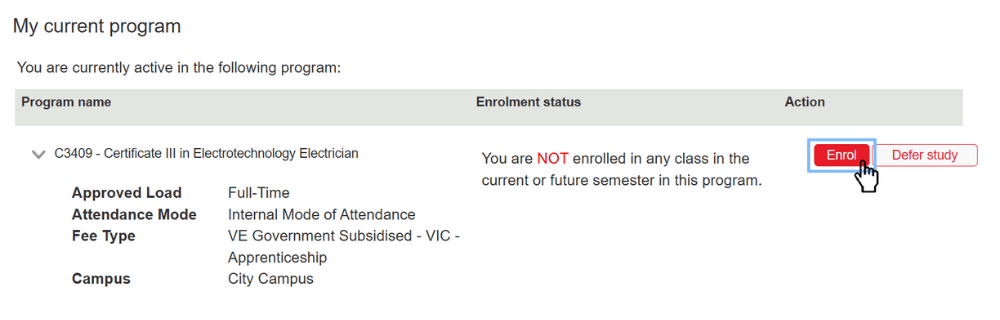
b. Select 'Manage Study'. Then select 'Enrol' next to your program.

Screenshot of Apprentice and Traineeship EOL Step 1. Start enrolment

Step 2. Start your pre-enrolment tasks for Training Support Review 

You’ll be guided through the steps required for your Training Support Review, which is the first of two pre-enrolment task lists you need to complete.  

In this task list, you will: 

  • Answer questions for the pre-training review 
  • Verify your identity and citizenship 
  • Answer questions for government support eligibility.

Find out more about these tasks below. 

Pre-training review

The pre-training review determines if the program is suitable for you and identifies any support you may need. You will answer questions about your education, career goals, technology access, and accessibility needs. 

RMIT then carries out its assessment. This usually takes between 1-2 business days, and we’ll email you when it’s complete. 

Find out more about the pre-training review, including how to complete it and frequently asked questions.  

Citizenship verification and Government support eligibility

To prove you are eligible for a government subsidised place in your program, you must: 

  • Verify your citizenship and residency status 
  • Answer questions about your education history. 

Your first, middle and last name must exactly match the document used to verify your citizenship and identity.

If your name doesn't match, you will have the chance to update it in Enrolment Online as you verify your citizenship.

RMIT carries out its assessment

Once you reach the ‘Review’ step in your pre-enrolment tasks for Training Support Review, RMIT uses the information you provided in Step 2 to assess your pre-training review and government support eligibility.  

  • You may need to wait 1-2 business days for this assessment to be completed
  • If we need more information, we will contact you by phone or email
  • We will email you once the assessment is complete
  • You can monitor the status of RMIT’s assessment in Enrolment Online.  

While you wait, you can save time by completing Step 4: Complete Personal Details Review 

Step 4. While you wait: complete Personal Details Review

While you wait for Step 3 to be completed by RMIT, you can save time by completing the pre-enrolment tasks for Personal Details Review. This is the second of two pre-enrolment task lists you need to complete.  

Please note: if you are a permanent resident, you will not be able to complete your Personal Details Review tasks until your citizenship is manually verified.

To access this pre-enrolment task list: 

  • Navigate to the Enrolment Online homepage 
  • Select Tasks & Messages 
  • Under Tasks, find and select the pre-enrolment tasks for Personal Details Review. 

In this task list, you will need to: 

  • Read and accept the student declaration 
  • Enter your personal and contact details 
  • Add your USI (Unique Student Identifier). Go to How to enrol – Part 1 > 3. Create your USI to find out how to create a USI 
  • Provide statistical data required by RMIT and the government. 

Please follow the prompts to complete all the steps. 

How to enrol – Part 3

You’re nearly there! Follow the steps below to complete your enrolment and become an official RMIT student.

Step 1. Finish your pre-enrolment tasks for Training Support Review

Once RMIT completes its assessment, we’ll send an email to your RMIT student email address letting you know you can return to Enrolment Online to finish your pre-enrolment tasks for Training Support Review.  

To access this pre-enrolment task list: 

  • Log in to Enrolment Online
  • Select Tasks & Messages
  • Under Tasks, find and select the pre-enrolment tasks for Training Support Review.

In this task list, you will need to: 

  • Review and accept the outcome of support assessment  
  • Review and agree to your Training Plan, if required 
  • Apply for fee concession, if eligible. 

Find out more about these tasks below. 

Review and accept outcome of support assessment

You will be prompted to review and accept the outcome of your support assessment.  

  • If assessed as eligible, you will receive a government subsidised place (GSP), reducing the cost of your training.  
  • If  you're in an eligible program and have been offered a Free TAFE place, it's at this point that you'll be able to accept your 'Free TAFE' offer in your program. It's important to note that if you select 'no', you won't be enrolled in a Free TAFE place and will instead be charged the Government subsidised fee rate for your program.   

Agree to your Training Plan

You will be prompted to read and agree to your Training Plan. You need to agree to continue enrolling. 

If you need to refer back to your Training Plan after you complete your pre-enrolment, follow these steps:  

  1. Log in to Enrolment Online 
  2. Select  Manage Study 
  3. Select  Records & Progress 
  4. Select Apprentice/Trainee Plan. 

Apply for a fee concession (if eligible)

You're eligible for a fee concession if: 

  • You're enrolling in a certificate I - IV program and 
  • You hold a current Centrelink concession card or are waiting for a Centrelink concession card. 

If you are not eligible for a fee concession, skip to 3. Add classes.

I’m eligible, but don't yet have my concession card 

If you don’t yet have your concession card, you can skip this step and apply for fee concession later. You must apply before your class start date to access the concession fee rate. 


I’m eligible and the named cardholder 

Enter your Customer Reference Number (CRN) or Veterans’ Affairs Reference Number (VRN).  

You’ll be notified immediately of your eligibility for a fee concession and can then proceed to Step 3. Attend enrolment session.


I’m eligible and named as a child or dependant on the card 

Complete an  Application for vocational education fee concession and exemption form. You can collect a hard copy application form from Student Connect . 

Submit your completed form in person to Student Connect  along with:  

  • The original concession card, and 
  • any other documentation required to support your application (e.g. Job Seeker referral form for Job Seekers). 

Step 2. Find out about your fees

a. Estimate your fee amount 

To find an estimate of fees for your vocational education course, look under 'Fees' on your relevant course page. 

b. Find out about employer sponsorship 

After speaking with your employer, you may want to apply for a sponsorship. This means that your employer will pay the remainder of your fees. See Step 2a. for more information. 

c. Find out if you're eligible for an Australian Apprenticeship Support Loan 

The Australian Government provides Australian Apprenticeship Support Loans to eligible apprentices to assist with everyday costs while you complete your apprenticeship. 

Find out if you're eligible for an Australian Apprenticeship Support Loan.

Step 2a. Apply for employer sponsorship of your fees

Fees for government subsidised places are subsidised by the Victorian Government, with the remainder payable by you or your employer.

After speaking with your employer you may wish to apply for a sponsorship, which means they will pay the remainder of your fees. Refer to the terms and conditions below.

You're ineligible for sponsorship if you have any overdue fees.


When to apply

You must apply when you first enrol, or immediately after enrolment.

You must then re-apply each year during the enrolment period.


How to apply

  1. Register your intent to apply for a sponsorship through Enrolment Online, (in the Finances section). After you register in Enrolment Online you will be presented with a link to the hard copy Apprentice/trainee sponsorship application. 
  2. Print the application. You and your employer must both complete and sign the application. 
  3. Submit the application by email or post by the deadline specified in Enrolment Online:
  • by email to: sponsorship.applications@rmit.edu.au, or
  • by post to: 

Student Sponsors
Financial Services Group
RMIT University
GPO Box 2476
Melbourne
VIC 3001

You and your employer must each retain a copy of your completed signed application.

If you don't complete and submit your application by the deadline specified in Enrolment Online, you will be responsible for all fees and charges.


After you apply

Applications that are fully and accurately completed are normally processed within 5 working days.

If RMIT approves your application, we will send your employer a tax invoice outlining fees and charges to be paid via their nominated mailing or email address.

All fees and charges must be paid by the due date stated on the invoice. Any delay in payment of these charges may result in overdue fee restrictions.

RMIT will contact you and your employer if your application is not approved.


Terms and conditions for sponsored students

Student

To become and remain a sponsored student you must be an apprentice or trainee and provide a signed Apprentice/trainee sponsorship application each calendar year.

If you do not submit a completed Apprentice/trainee sponsorship application by the due date of the first tax invoice you will, as an enrolled student, be liable for fees incurred.

In the event that your sponsor’s application is not accepted, you will remain enrolled and will continue to be personally responsible for any fees and charges.


Employer

An agreed sponsor will be liable for the debt incurred for the new sponsorship period indicated on the Apprentice/trainee sponsorship application. A new signed Apprentice/trainee sponsorship application must be completed each calendar year.

All fees and charges must be paid by the sponsor by the original due date stated on the tax invoice. Any delay in payment of these charges will result in overdue fee restrictions being applied to the student's record.

Having signed the Apprentice/trainee sponsorship application, a company shall remain liable for fees invoiced by RMIT for that enrolment, even if:

  • the student’s employment with the sponsor is terminated
  • the student cancels their enrolment with RMIT
  • the student fails to satisfy the assessment criteria of the RMIT program.
  • See Understand your fees, including materials and the student services and amenities fee.


RMIT

On receipt of a completed Apprentice/trainee sponsorship application, RMIT maintains the right to perform any appropriate data validation and credit worthiness checks prior to accepting the application of sponsorship.

RMIT reserves the right to make a decision on the application of any company wishing to become a sponsor based on information provided via the above processes.

Where a sponsorship application is not accepted, the student will remain enrolled and be advised that they continue to be personally responsible for any charges.


Apprenticeship/Traineeship enrolment administrator

Advice will be provided to apprentices and trainees and employers regarding the terms and conditions for sponsored students by the Apprenticeship/Traineeship enrolment administrator. 

Step 3: Add classes

Finally, it’s time to enrol in classes. 

You can do this in Enrolment Online by following the steps below. 

Or, if you want assistance, you can wait until your orientation session and ask a staff member to help you enrol in classes. 

a. From Manage Study > Manage Enrolment > Add, Drop, Change Classes, select  Continue next to the semester you’re enrolling into

Screenshot of Apprentice and Traineeship EOL Step 4. Add classes - a. Select Continue


b. Select Show classes.

Screenshot of Apprentice and Traineeship EOL Step 4. Add classes - b. Select Show classes

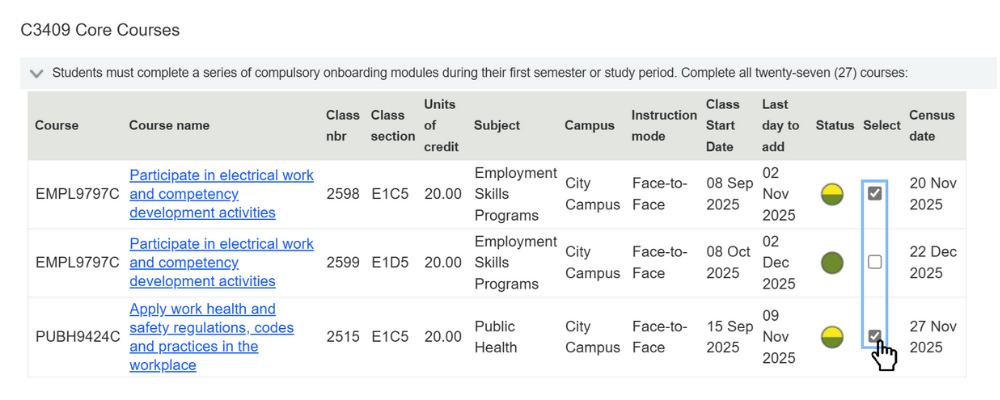
Your classes will be pre-selected for you.

Screenshot of Apprentice and Traineeship EOL Step 4. Add classes - b. Select Show classes - Your classes will be pre-selected for you


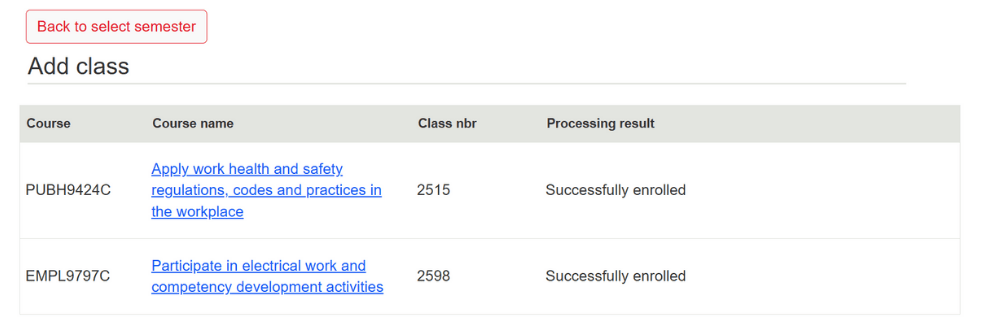
c. Select Add selected classes. Your class enrolments will now be displayed.

Screenshot of Apprentice and Traineeship EOL Step  4c. Your class enrolments will be displayed


d. When you're finished adding classes, log out of Enrolment Online using the log out icon in the top right banner.


Prove your enrolment

If you need proof of your enrolment, e.g. for Centrelink, your official Statement of Enrolment (SoE) will be available in Enrolment Online the day after you enrol.

Congratulations! You’re now officially an RMIT student!

Four students talking on the RMIT City campus

Get ready for classes

Now you're enrolled, it's time to get ready for life at RMIT! Complete essential tasks before classes begin so you’re ready from day one.

Need help?

aboriginal flag float-starttorres strait flag float-start

Acknowledgement of Country

RMIT University acknowledges the people of the Woi wurrung and Boon wurrung language groups of the eastern Kulin Nation on whose unceded lands we conduct the business of the University. RMIT University respectfully acknowledges their Ancestors and Elders, past and present. RMIT also acknowledges the Traditional Custodians and their Ancestors of the lands and waters across Australia where we conduct our business - Artwork 'Sentient' by Hollie Johnson, Gunaikurnai and Monero Ngarigo.

Learn more about our commitment to Aboriginal and Torres Strait Islander peoples