Admin and general enquiries
For academic advice, enrolment support or other general enquiries, contact Student Connect.
Technical issues
If you have technical problems with Enrolment Online or password queries, contact IT Service Connect
Please note: this guide also applies to students in programs formerly delivered through RMIT Online.

Enrolment Online will be unavailable on Saturday 17 October from 7:00am to 3:00pm AEDT due to scheduled system maintenance. Please complete any enrolment activities outside the outage period.
Your key enrolment deadlines are in the tables below. All key academic dates are on the RMIT Online important dates page.
Select the tab below based on your cohort.
| Teaching period (TP) dates | Last day to enrol in courses | Orientation week | Census date |
|---|---|---|---|
| TP1: 8 Jan - 22 Mar | 8 January | 2-6 January | 23 January |
| TP2: 8 Apr - 21 Jun | 8 April | 1-5 April | 23 April |
| TP3: 8 Jul - 20 Sep | 8 July | 1-5 July | 23 July |
| TP4: 30 Sep - 13 Dec | 30 September | 23-27 December | 15 October |
| Teaching period (TP) dates | Last day to enrol in courses | Orientation Week | Census date |
|---|---|---|---|
| TP1: 8 Jan - 23 Feb | 8 January | 2-6 January | 18 January |
| TP2: 4 Mar - 19 Apr | 4 March | 26 Feb - 1 Mar | 14 March |
| TP3: 29 Apr - 14 Jun | 29 April | 22-26 April | 9 May |
| TP4: 1 Jul - 16 Aug | 1 July | 24-28 June | 11 July |
| TP5: 26 Aug - 11 Oct | 26 August | 19-23 August | 5 September |
| TP6: 21 Oct - 6 Dec | 21 October | 14-18 October | 31 October |
| Online term (OT) dates | Last day to enrol in courses | Orientation Week | Census date |
|---|---|---|---|
| OT1: 4 Mar - 31 May | 7 March | 26 Feb-1 Mar | 31 March |
| OT2: 22 Jul - 18 Oct | 29 July | 15-19 Jul | 31 August |
| OT3: 18 Nov - 17 Feb 2025 | 25 November | 11-15 Nov | 6 December |
Complete all steps below to enrol in your program.
Use a desktop or laptop computer to enrol, and enable pop-ups in your browser settings.
You need the following documents and information to enrol.
You will need your current Australian/New Zealand passport (preferred), Australian citizenship certificate, birth certificate or other approved documentation to verify your citizenship.
IMPORTANT: If you used a different name to apply to RMIT, i.e. not your full legal name as it appears on your document, you’ll have the chance to update it when you log in to Enrolment Online.
If your names don't match, you won't be able to enrol.
Find out how to update your legal name and preferred name options.
You’ll use your student ID, RMIT email address and temporary password to access Enrolment Online (RMIT’s enrolment system) and other RMIT systems.
Your student ID (also referred to as your RMIT ID) is the letter 's' followed by your student number (excluding any additional letters).
Example: s1234567
Your student number is in your offer email from RMIT.
Your RMIT email address is the letter 's' followed by your student number (excluding any additional letters) and ‘@student.rmit.edu.au’.
Example: s1234567@student.rmit.edu.au
Your student number is in your offer email from RMIT.
You may need to access your email to complete the enrolment process. Find out how to access and use your RMIT email.
New students: Your temporary password is the letter 'p' followed by your date of birth backwards, with an exclamation mark '!' at the end.
Example: If your date of birth is 8 April 1998, then your password is p19980408!
Returning students: If you've previously studied at RMIT, your password is the last password you set while studying here. We recommend resetting your password if you don't remember it.
Find out more about your login details, password and accessing RMIT systems.
MFA requires a user to provide two factors of verification:
You'll need your Tax File Number (TFN) if eligible to apply for a HELP loan. Your TFN must validate on your loan application. Find out how to validate your TFN with the Australian Taxation Office (ATO) now.
If you don’t have a TFN, you can still apply for a HELP loan when you enrol and provide your TFN later, as long as it’s before the census date.
It’s easy to apply for a TFN online, but it can take up to 30 days, so apply now if you don’t have one.
The USI is a reference number that will give you access to an online record of all of your recognised training and qualifications. It’s a government requirement that you have a USI to enrol in a higher education program.
You’ll need ID such as a current passport, full birth certificate or driver’s license. You must use the same ID when you verify your citizenship and identity.
You must use your full legal name to create a USI. Make a note of your USI because you’ll need to provide it when you enrol.
Your name must match the order and placement of your full legal name recorded at RMIT. If there’s a discrepancy between your recorded name in the USI Registry and our systems, you won’t be able to verify your USI and enrol.
Note: International students studying outside of Australia do not need to provide a USI.
Log in to Enrolment Online using your RMIT email address, temporary password and MFA (see Step 1, b. and c.).
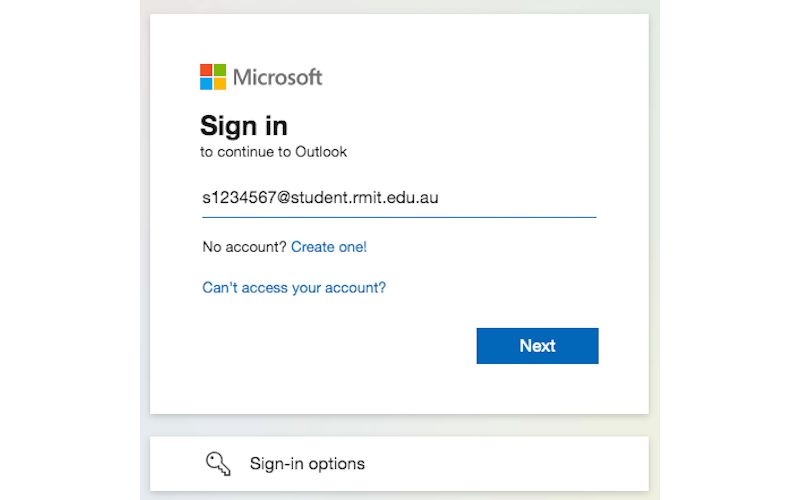
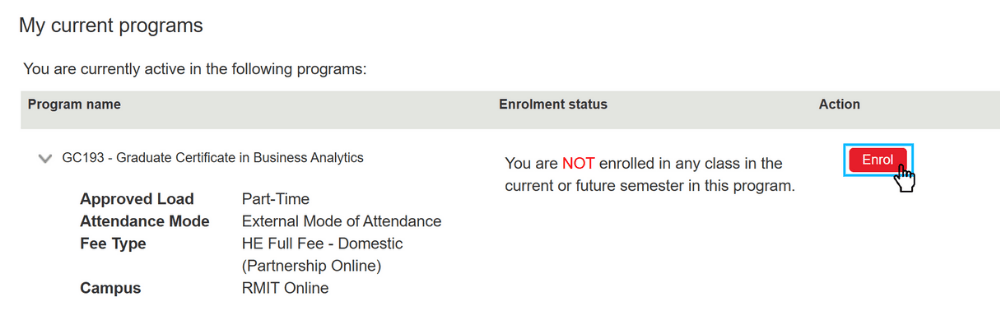
You'll now be asked to verify your citizenship. If you have a current Australian/New Zealand passport or Australian citizenship certificate or birth certificate, you can do this instantly online.
If you use a different document, you’ll be asked to email a scanned copy or photo using your RMIT student email account. You’ll receive an email when you can continue to enrol. This will usually take up to 48 hours.
If you used a different name to apply to RMIT, i.e. not your full legal name as it appears on your document, update your details now in Enrolment Online.
If you’ve been offered a Commonwealth supported place (CSP) you’ll be prompted in Enrolment Online to complete a Request for a Commonwealth supported place and a HECS-HELP loan form (also known as an electronic Commonwealth Assistance Form, or eCAF) via the government eCAF website. You must submit this form before you can enrol, even if you are not applying for HECS-HELP.
If you want to apply for HECS-HELP, you’ll need your Tax File Number (TFN) or 'Certificate of application for a TFN' ready to enter on your application.
Not finished the checklist? Click Save for later and come back to it when you're ready.
If eligible, you’ll be prompted in Enrolment Online to opt-in for a FEE-HELP loan and/or an SA-HELP loan (to cover your Student Services and Amenities Fee).
Please note that you need to apply for a new HELP loan for every program you enrol in, even if you've had an approved loan for a previous program.
To apply for a FEE-HELP or SA-HELP loan, click ‘yes’ to opt-in when prompted in Enrolment Online. An invitation will be sent to your RMIT student email account from the Australian Government with instructions to log in to the eCAF portal to start your application. Make sure you check your Spam folder if you can't find the email.
You must provide a validated Tax File Number (TFN) and a verified USI (see Step 2) by the census date to access any HELP loan.
Information about applying for a HECS-HELP loan is in Step 4. Complete My Checklist.
Find out more about how student loans work on the Australian Government’s Study Assist website, or visit RMIT's HELP loans and VET Student Loans to find out about applying for HELP loans.
You should enrol in courses for the full calendar year. If you are planning to take a break at a later date, you will need to apply for a leave of absence.
The following table shows which teaching periods or online terms you need to enrol in.
| Cohort | Teaching period/term to enrol in |
|---|---|
| Standard undergrad/postgrad |
RMIT Online Jan-Jun - for enrolling in TP1 and TP2 RMIT Online Jul-Dec - for enrolling in TP3 and TP4
|
| Accelerated postgrad |
RMIT Online Jan-Jun - for enrolling in TP1, TP2 and TP3 RMIT Online Jul-Dec - for enrolling in TP4, TP5 and TP6
|
| Juris Doctor |
Online Term 1 - March commencement Online Term 2 - July commencement
Online Term 3 - November commencement
|
If your offer letter states that you've been granted credit exemptions for some classes, you don't need to add these to your enrolment.
See more information about credit for prior study or experience.
If you are not sure about which classes to select, speak to your Student Advisor, or contact your School or College via RMIT Student Connect.
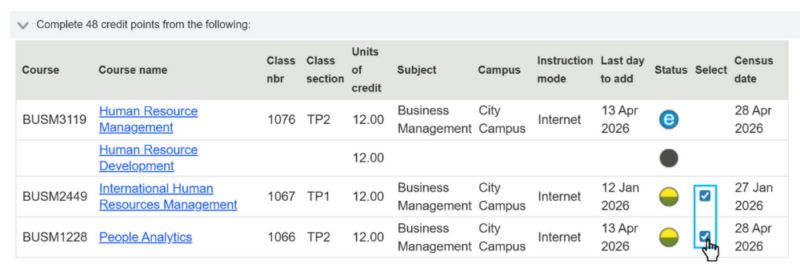
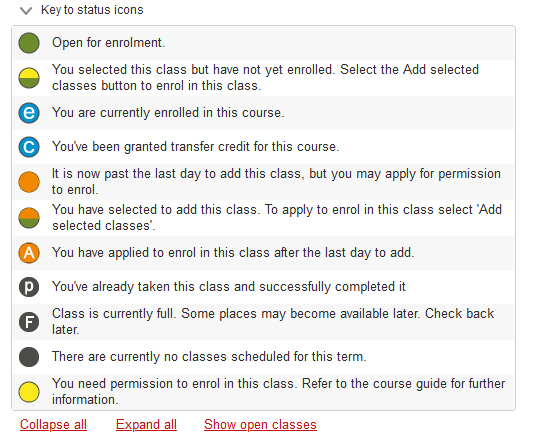
The Status column indicates the availability of classes. These will change as you enrol. See the key below.
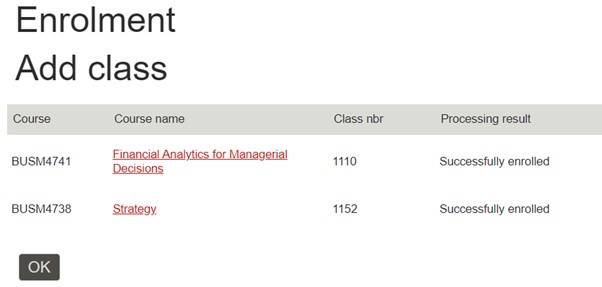
The classes you're enrolled in will now be displayed.
Log out of Enrolment Online using the icon in the top right banner.
You can change your enrolment in Enrolment Online up until the last day to add or drop a class. See the RMIT Online important dates for details.
If you need proof of your enrolment, e.g. for Centrelink, your official Statement of Enrolment (SoE) will be available in Enrolment Online the day after you enrol.
Now it’s time to get set for study and life at RMIT. Get your student card, set up your email and passwords, attend Orientation and more.

Orientation week is all about helping you get familiar with RMIT processes, your program and everything else that life at RMIT has to offer! Orientation week (O Week) happens the week before your classes start.
You will be contacted by email before Orientation week with information to get you organised.
The last day to enrol in courses for the next teaching period or online term is in the RMIT Online important dates.
Before you exit Enrolment Online, check your enrolment to ensure all details are correct.
For academic advice, enrolment support or other general enquiries, contact Student Connect.
If you have technical problems with Enrolment Online or password queries, contact IT Service Connect



RMIT University acknowledges the people of the Woi wurrung and Boon wurrung language groups of the eastern Kulin Nation on whose unceded lands we conduct the business of the University. RMIT University respectfully acknowledges their Ancestors and Elders, past and present. RMIT also acknowledges the Traditional Custodians and their Ancestors of the lands and waters across Australia where we conduct our business - Artwork 'Sentient' by Hollie Johnson, Gunaikurnai and Monero Ngarigo.
Learn more about our commitment to Aboriginal and Torres Strait Islander peoples