Vocational education enrolment guide – Domestic full fee and industry students

Complete all steps in this guide if you're enrolling in a full-fee place, or as an industry or specialised cohort in a non-award, diploma or advanced diploma program.

It is important to start the enrolment process as early as possible.

You may need more than one sitting to complete the enrolment process. We recommend bookmarking this page so you can easily return to it when you are ready to continue.

Before you start, you will need:

You will need one of the following to verify your citizenship:

  • current Australian/New Zealand passport (preferred)
  • Australian citizenship certificate
  • birth certificate 
  • other approved documentation.

Read the complete list of acceptable identity documents here.

If the name you used to apply to RMIT is different to your full legal name, update it when you log in to Enrolment Online.

If your names don't match, you won't be able to enrol. Learn how to update your legal name and preferred name options.

Your USI (Unique Student Identifier) is a reference number that gives you access to an online record of all your recognised training and qualifications. It’s a government requirement for enrolling in a vocational education program.

How to create a USI
1. Get your ID ready

You will need one of the following forms of ID:

  • Current passport
  • Full birth certificate
  • Driver’s license
2. Create your USI
  • Go to usi.gov.au or click the button below.
  • Use your full legal name when creating your USI.
  • Make a note of your USI because you need to provide it when you enrol. 

Your name in the USI registry must match your full legal name recorded at RMIT.

Any discrepancy between your name in the USI registry and RMIT's systems will prevent you from verifying your USI and enrolling.

You’ll use your Student ID, RMIT email address and temporary password to access Enrolment Online (RMIT’s enrolment system) and other RMIT systems. 

Student ID

Your student ID is the letter 's' followed by your student number (excluding any extra letters) e.g., s1234567. Your student number is in your RMIT offer email.

RMIT email address

Your RMIT email address is your Student ID and ‘@student.rmit.edu.au’ e.g., s1234567@student.rmit.edu.au. 

Password

Your temporary password is the letter 'p' followed by your date of birth backwards (YYYYMMDD) with an exclamation mark '!' e.g., p20020418! 

After your first login, update your password to something more secure by following the instructions on the RMIT ID and password page.

If you have studied at RMIT before: Your password is the last password you had while studying at RMIT. If you have forgotten your password, you can reset it.

You will need a Tax File Number (TFN) if you are eligible and want to apply for a VET Student Loan (See 3. Opt-in for a VET Student Loan). Your Tax File Number must validate with the Australian Taxation Office (ATO) on your loan application. Find out how to validate your TFN.

Don't have a Tax File Number?
  • You can apply for a TFN online via the Australian Taxation Office website. 
  • It can take up to 30 days to get a TFN.
  • You can still opt-in for a VET Student Loan in Enrolment Online when you enrol. To be approved for a loan, you must then provide your TFN in Enrolment Online before your census date. 

To enrol in Enrolment Online, you need to use a desktop or laptop computer and enable pop-ups in your browser settings. 

Deadline to enrol

To secure your preferred classes and timetable and to ensure you can access your course materials before classes start, we strongly recommend enrolling as early as possible. 

The deadline to add classes is listed as the ‘last day to add classes’ in your academic calendar.

Steps to enrol

You can complete these steps at your own pace.

Feel free to pause and come back when you are ready to continue.

1. Log in to Enrolment Online

a. Log in to Enrolment Online using your RMIT email address and temporary password

To log in to Enrolment Online you need:

  1. Your RMIT email address
  2. Your temporary password
  3. A mobile phone to register for multi-factor authentication (MFA). You will be automatically prompted to download the Microsoft Authenticator app once you have entered your email address and password. If you register for MFA with a mobile phone number outside Australia, you can update your number in Australia by contacting IT Service Connect.
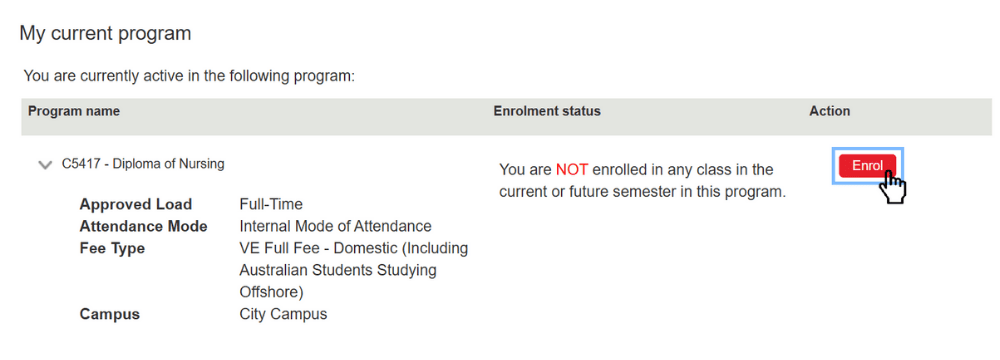
b. Select 'Manage Study'. Then select 'Enrol' next to your program.
Screenshot of VE full fee EOL step 1. Start your enrolment

2. Complete your pre-enrolment tasks

You’ll be guided through the steps you need to complete before you can enrol: 

  • Read and accept the student declaration 
  • Enter your personal and contact details 
  • Verify your identity and citizenship or residency status (find out more about this step below) 
  • Add your USI (Unique Student Identifier). Go to the Before you start section to find out how to create a USI 
  • Provide statistical data required by RMIT and the government. 

Verify your citizenship and identity

To instantly verify your citizenship online, you will need one of the following documents: 

  • Current Australian passport (preferred) 
  • Australian citizenship certificate 
  • Australian birth certificate 
  • Current New Zealand passport  

If you use a different identity document, you will be prompted to email a scan or photo of the document from your RMIT student email address, which needs to be verified by an RMIT staff member before you can continue enrolling. Most verifications are completed within 2 business days. We will email you at your RMIT email address when you can continue.

Your first, middle and last name must exactly match the document used to verify your citizenship and identity.

If your name doesn't match, you will have the chance to update it in Enrolment Online as you verify your citizenship. 

3. Request an optional VET Student Loan

In Enrolment Online, you will be asked if you're interested in applying for a VET Student Loan. A VET Student Loan is an optional Australian Government loan that covers all or part of the tuition fees for eligible vocational education students and RMIT programs.


a. Check your eligibility

Check if you're eligible on the Australian Government’s website.

View the list of eligible RMIT programs to check that you're enrolling in an eligible program. 

b. If eligible, request to apply for a loan

In Enrolment Online, answer 'Yes' when asked if you intend to apply for a loan. You will then receive an invitation to your RMIT student email address to access the government portal. Use the details in this email to complete and submit your loan application once you have enrolled. See 5. Complete a VET Student Loan application.  

You will need to wait 48 hours after enrolling in your classes before you can submit your application through the Government portal.

4. Add classes

a. Choose your semester

Enrol in both Semester 1 and Semester 2 (unless you are enrolling in only one semester).


b. Click on 'Show classes'

If you have been given a Class section code by your school to help you to select classes, enter this in the 'Class section' field and then select 'Show classes'.


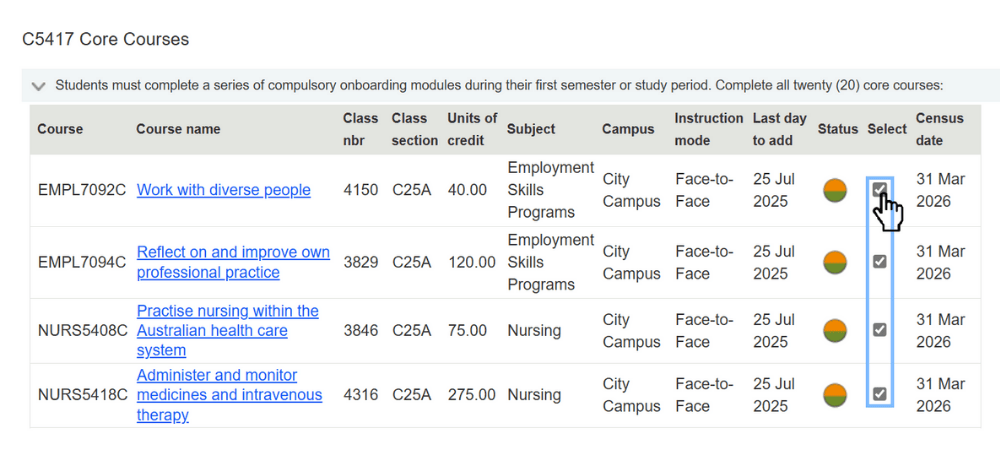
c. Select the classes for the Semester you are enrolling into
Screenshot of VE full fee EOL Step 4. Add classes

Once you have selected the classes you want to enrol into, or if your classes are already selected, click the Add selected classes button to continue.

d. Check that all your enrolment details are correct
 
e. Log out 

When you're finished adding classes, log out of Enrolment Online using the log out icon in the top right banner.

5. Complete a VET Student Loan application (if you told RMIT you wanted to apply in Step 3)

If you were eligible, have told RMIT you want to applyfor a VET Student Loan (VSL) in 3. Request an optional VET Student Loan, and have waited 48 hours since adding your classes, you can now complete your VSL application in the government portal. 

Follow the steps on RMIT’s VET Student Loans webpage to complete your application for a VET Student Loan.  

You must complete all steps by your earliest fee due date to ensure your loan is approved on time and to avoid overdue fee restrictions. You can check your fee due date on your RMIT invoice.

Your loan isn't approved until you receive a loan approval letter.

If your loan is approved, a loan approval letter will be issued to you in Enrolment Online. We’ll send an email to your RMIT student email address to let you know when this happens. 

Congratulations! You’re now officially an RMIT student!

Need help?

aboriginal flag float-starttorres strait flag float-start

Acknowledgement of Country

RMIT University acknowledges the people of the Woi wurrung and Boon wurrung language groups of the eastern Kulin Nation on whose unceded lands we conduct the business of the University. RMIT University respectfully acknowledges their Ancestors and Elders, past and present. RMIT also acknowledges the Traditional Custodians and their Ancestors of the lands and waters across Australia where we conduct our business - Artwork 'Sentient' by Hollie Johnson, Gunaikurnai and Monero Ngarigo.

Learn more about our commitment to Aboriginal and Torres Strait Islander peoples