VE GSP enrolment video – Transcript
[On-screen text: Get ready to enrol – Vocational Education Government Subsidised Place students]
Zeyneb: Hey there, in this video we're going to tell you about what to expect when enrolling into your Vocational Education program, in a Government Subsidised Place.
Otto: We'll also give you some tips to help navigate some of the key steps in the process.
Otto: Enrolling is easy, but it does require a bit of preparation.
Otto: You can start enrolling as soon as you receive your offer.
Zeyneb: Programs can fill up, so we recommend getting started early to avoid missing out, and to make sure you're ready to go from the first day of classes.
[On-screen text: Get started early]
Zeyneb: You'll also need to factor in a day or two to pause for RMIT to assess some of your documents and information, as part of the Government requirements for subsidised and Free TAFE places.
[On-screen text: Factor in a 1-2 day pause while RMIT assesses your information]
Otto: Your enrolment guide will walk you through the process step by step. So simply follow the steps.
[On-screen text: Follow your enrolment guide, step by step]
Otto: And remember, if at any stage you need to take a break, you can always return to Enrolment Online to pick up where you left off.
[On-screen text: Before you start]
Zeyneb: Before you get started, there are a few things you'll need to have ready:
Zeyneb: Firstly, use a desktop or laptop computer, and enable pop-ups in your browser settings.
[On-screen text: 1. Desktop or laptop computer with pop-ups enabled]
Zeyneb: To log in for the first time, you'll need your RMIT student ID and temporary password. Your student ID can be found in your offer letter and instructions on entering your temporary password are in the enrolment guide.
[On-screen text: 2. RMIT student ID and temporary password]
Otto: Make sure you have some valid ID handy, like a passport or birth certificate, as you'll need this to verify your citizenship and residency status.
[On-screen text: 3. Valid ID, e.g. passport or birth certificate]
Otto: You'll need a Unique Student Identifier, or 'USI', which you can create using the link in your enrolment guide.
[On-screen text: 4. Unique Student Identifier (USI)]
Otto: If you're eligible and want to apply for a VET Student Loan, you'll also need your tax file number.
[On-screen text: 5. Tax File Number (TFN)]
Otto: If you don't have a Tax File Number, you can still opt-in for a VET Student Loan when you enrol and provide it later, as long as it's before the census date.
[On-screen text: Complete the Language, Literacy and Numeracy Assessment]
Zeyneb: Before you can enrol, you'll need to complete a literacy and numeracy assessment. This is a requirement for enrolling in a government subsidised place.
Zeyneb: To start your assessment, log in to the 'Basic Key Skills Builder' website using your RMIT student number and password and complete the two tests required. It should take around 45 minutes.
[On-screen text: Log in to the ‘Basic Key Skills Builder’ website using your RMIT student number and password. Complete the two tests required.]
[On-screen text: Complete the Pre-training Review]
Otto: You'll then need to complete your Pre-training Review in Enrolment Online. This is a government requirement to confirm that your program is suitable for you and your career goals.
Otto: Read and answer each question carefully. You'll be asked for an example of a job or area of further study you wish to achieve by undertaking the program.
[Screen recording showing the pre-training review page in Enrolment Online, with a student responding to why they wish to enrol in the program. Example answer shown: 'I want to become web developer and pursue further studies in the Bachelor of Business.']
Otto: It's important that you provide a complete answer to this question, as incomplete or unclear responses may delay the assessment of your pre-training review. Or it may indicate the program may not be suitable for you to study with a Government Subsidised Place.
[On-screen text: Complete the Evidence of Student Eligibility Declaration]
Zeyneb: You'll also need to complete the Evidence of Student Eligibility Declaration. This helps RMIT to assess and confirm your eligibility to enrol in a Government Subsidised Place, including Free TAFE.
[On-screen text: Verify your citizenship and residency status.]
Zeyneb: You'll be asked to answer questions about your education history and verify your citizenship online using a citizenship document, such as your passport or birth certificate.
[On-screen text: Make sure your name matches with your citizenship document and USI.]
Zeyneb: To verify these details online, it's important that your name exactly matches the document you're using to verify your identity, as well as the name you have registered with your USI. If your name doesn't match, you'll have the option to correct it, so you can verify online.
[Screen recording showing a student selecting a citizenship document, clicking 'Yes' to 'Do you need to change your name?' and then adjusting their name by entering a middle name, then clicking 'Okay']
Zeyneb: After you've submitted the assessment, RMIT will review it. This usually takes between 1 – 2 days, so be sure to factor in extra time for this step in the process.
[On-screen text: Wait 1-2 days for RMIT to review your information]
Zeyneb: Make sure you check your phone and email, as RMIT may need to contact you for more information.
[On-screen text: Check your phone and email. RMIT may contact you for more information.]
Zeyneb: Once your assessment is complete, we'll send an email to your RMIT email address, letting you know that you can continue your enrolment.
Zeyneb: If you're in an eligible program and have been offered a Free TAFE place, it's at this point that you'll be able to accept your 'Free TAFE' offer in your program.
[Screen recording showing the option in Enrolment Online where a student accepts or denies offer of Free TAFE]
Zeyneb: It's important to note that if you select 'no', you won't be enrolled in a Free TAFE place and will instead be charged the Government subsidised fee rate for your program.
[On-screen text: Opt-in to apply for a VET Student Loan]
Otto: If you're enrolling in a Diploma or Advanced Diploma program, you may be eligible to apply for a VET Student Loan. If you're eligible, we'll ask you to 'opt in' to let us know you'd like to take out the loan.
[Screen recording showing the process in Enrolment Online where students have the option to opt in for a VET Student Loan]
Otto: You'll get an invite at your RMIT email address to access the government portal and opt-in. However, you won't be able to complete your loan application until 48 hours after you've enrolled in classes, so remember to come back to this after you enrol.
[On-screen text: Check your RMIT email address to access the government portal and opt-in. After you enrol, wait 48 hours. Complete your VET Student Loan application.]
[On-screen text: Enter your personal details]
Zeyneb: Next up, you'll be asked to confirm your personal details, answer some statistical questions, and provide your USI. If you didn't create your USI earlier, you can do it at this stage. It only takes a few minutes.
[On-screen text: Confirm your personal details. Answer some statistical questions. Provide your USI.]
[On-screen text: Add your classes]
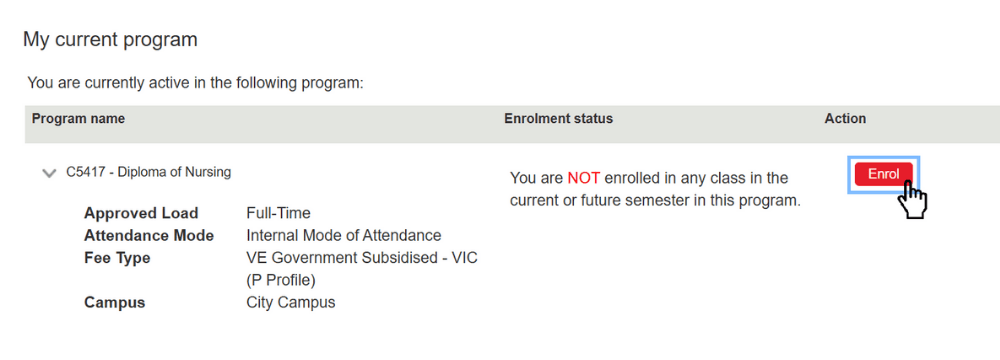
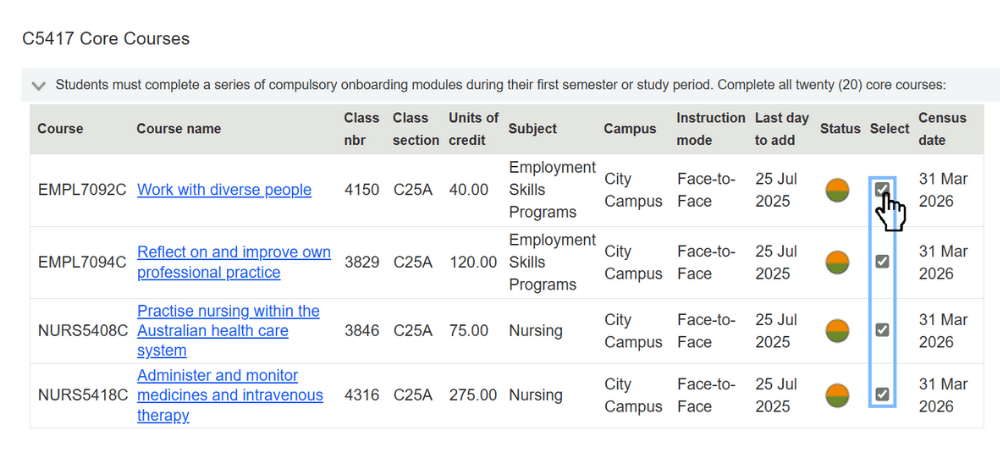
Otto: Finally, you can lock in your classes! Your classes should be pre-ticked for you to make sure you enrol in the correct number of classes to complete your program. If they're not, follow the instructions in your program structure to contact your college for assistance via Student Connect. Add your selected classes to enrol, then you're done!
Otto: Ready to go? Great! Don't forget, all of this information is available in your enrolment guide. So please read it carefully and follow every step.
Zeyneb: If you need help at any stage in the process, you can contact Student Connect at rmit.edu.au/student-connect.
[On-screen text: rmit.edu.au/student-connect]
Zeyneb: We can't wait to welcome you to RMIT.