HE CSP full fee enrolment video – Transcript
[On-screen text: Get ready to enrol – Higher Education domestic students]
Zeyneb: Hey there, in this video we're going to tell you about what to expect when enrolling into your Higher Education course in either a full-fee or Commonwealth Supported Place.
Sukith: We'll also give you some tips to help navigate some of the key steps in the process.
Sukith: Enrolling is easy, it only takes about twenty minutes. You can start enrolling as soon as you've received your offer.
Zeyneb: We recommend getting started early to ensure you're ready to go from the first day of classes.
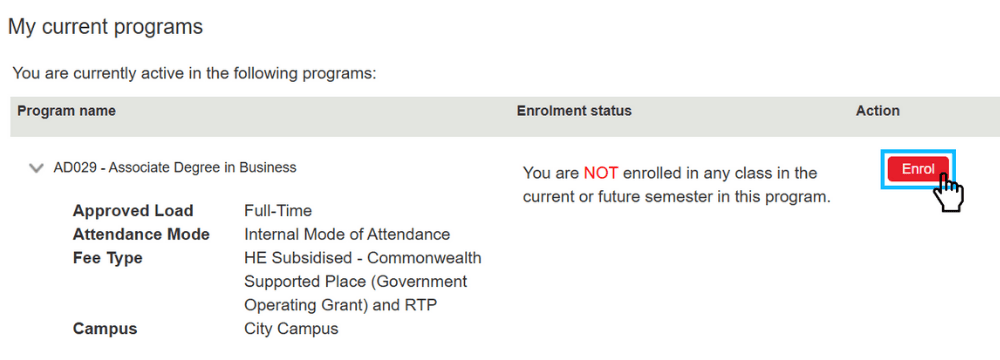
Zeyneb: Your enrolment guide will walk you through the process step by step. So simply follow the steps.
Sukith: And remember, if at any stage you need to take a break, you can always return to Enrolment Online to pick up where you left off.
[On-screen text: Before you start]
Zeyneb: Before you get started, there are a few things you'll need to have ready:
Zeyneb: Firstly, use a desktop or laptop computer, and enable pop-ups in your browser settings.
[On-screen text: Desktop or laptop computer with pop-ups enabled]
Zeyneb: To log in for the first time, you'll need your RMIT student ID and temporary password. Your student ID can be found in your offer letter and instructions on entering your temporary password are in the enrolment guide.
[On-screen text: RMIT student ID and temporary password]
Sukith: Make sure you have some valid ID handy, like a passport or birth certificate, as you'll need this to verify your citizenship and residency status.
[On-screen text: Valid ID, e.g. passport or birth certificate]
Sukith: You'll need a Unique Student Identifier, or 'USI', which you can create using the link in your enrolment guide. It only takes a few minutes.
[On-screen text: Unique Student Identifier (USI)]
Sukith: And, if you're applying for a HELP loan, you'll also need your Tax File Number.
[On-screen text: Tax File Number (TFN)]
Sukith: If you don't have a Tax File Number, you can still apply for a HELP loan when you enrol and provide it later, as long as you provide it before the census date.
[On-screen text: Verify your citizenship and residency status]
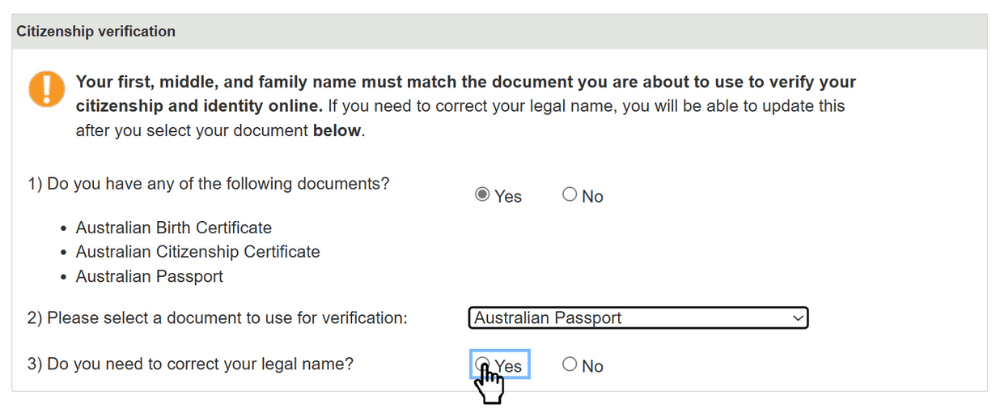
Zeyneb: One of the first things you'll need to do is verify your citizenship and residency status online using a citizenship document, like a passport or birth certificate.
[On-screen text: Verify your citizenship and residency status]
Zeyneb: This is a requirement to enrol at RMIT, as well as to access Commonwealth assistance, like your Commonwealth Supported Place or your HELP loan.
Zeyneb: To verify these details online, it's important that your name exactly matches the document you're using to verify your identity, as well as the name you have registered with your USI.
[On-screen text: Make sure your name matches with you citizenship document and USI.]
Zeyneb: If your name doesn't match, you'll have the option to correct it, so you can verify online.
[Screen recording showing a student selecting a document, clicking 'Yes' to 'Do you need to change your name?' and then adjusting their name by entering a middle name, then clicking 'Okay']
[On-screen text: Enter your personal details]
Zeyneb: You'll then need to confirm your personal details, answer some statistical questions, and provide your USI.
[On-screen text: Confirm your details. Answer statistical questions. Provide your USI.]
[On-screen text: Enrolling in a Commonwealth Supported Place (CSP)]
Sukith: If you're enrolling in a Commonwealth Supported Place, or 'CSP', you'll be prompted to complete a 'Request for a Commonwealth Supported Place' form.
[On-screen text: Complete the 'Request for a Commonwealth Supported Place' form]
Sukith: This is a requirement for all CSP students.
Sukith: You'll receive an email at your RMIT email address with a unique passkey.
Sukith: This will provide you with instructions on how to access the government's eCAF portal, where you'll complete the form.
Sukith: If you're eligible, you can indicate on your form that you wish to access a HECS-HELP loan to pay your student contribution amount.
[On-screen text: Apply for HECS-HELP if you are eligible]
Sukith: It's at this point you'll need to add your Tax File Number, or your application for a Tax File Number, before you can submit your form.
[On-screen text: Enrolling in a full-fee place]
Zeyneb: If you're enrolling in a domestic full-fee place, you may be eligible to apply for an optional FEE-HELP loan to cover your tuition fees.
[On-screen text: Opt-in to apply for FEE-HELP]
Zeyneb: Follow the prompts to let us know you're interested, and you'll receive an email at your RMIT email address inviting you to complete your application for FEE-HELP in the government's eCAF portal.
[On-screen text: Opt-in for an SA-HELP Loan]
Sukith: Regardless of whether you're enrolling in a Commonwealth Supported Place or a full-fee place, you may also be eligible to apply for an SA-HELP loan.
Sukith: This is a loan that covers your Student Services and Amenities Fee.
[On-screen text: Opt-in for an SA-HELP Loan]
Sukith: Follow the prompts to let us know you're interested, and you'll receive an email at your RMIT email address with instructions on how to apply.
[On-screen text: Add your classes]
Zeyneb: Finally, you can lock in your classes!
[On-screen text: Read your program structure to find out what courses you need to enrol in]
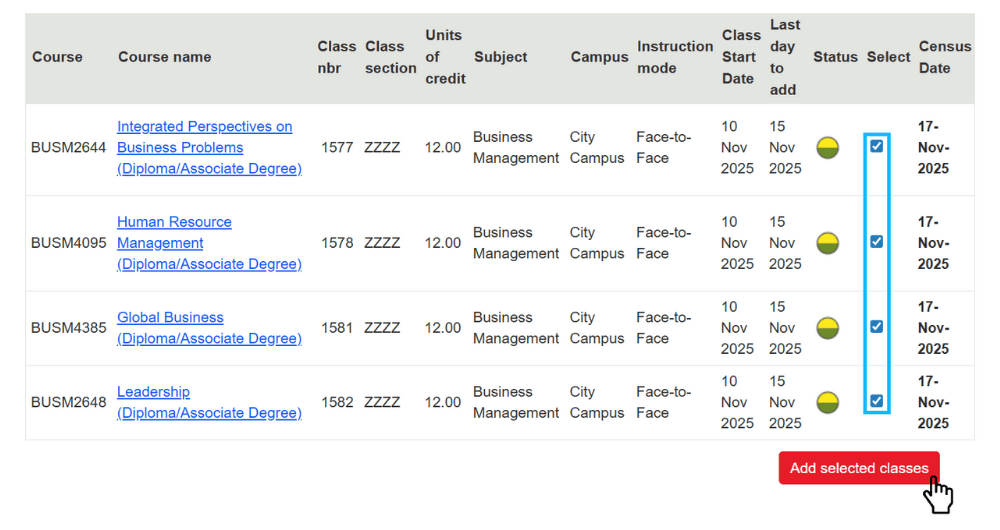
Zeyneb: It's important to read your program structure, which will include important information about the courses you need to enrol in.
Zeyneb: Your program structure will also confirm whether you need to add any courses in a different semester, such as the flexible semester.
Zeyneb: Add your selected classes, then you're done!
Sukith: Ready to go? Great! Don't forget, all of this information is available in your enrolment guide. So please read it carefully and follow every step.
Zeyneb: If you need help at any stage in the process, you can contact Student Connect at rmit.edu.au/student-connect
[On-screen text: rmit.edu.au/student-connect]
Zeyneb: We can't wait to welcome you to RMIT.